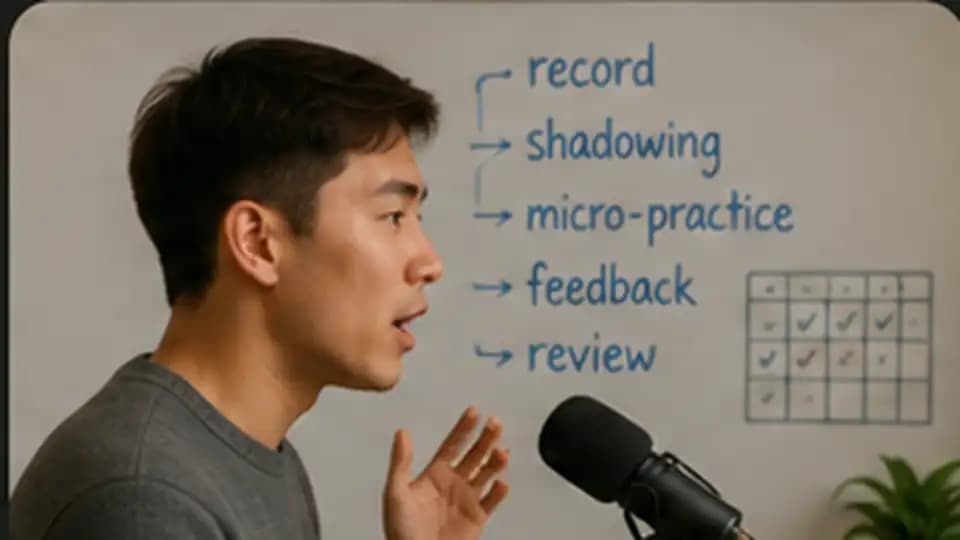
A short video can become a complete speaking lesson when you use AI as a practice partner rather than a translation machine. In about 45 minutes, you can extract useful phrases, rehearse their rhythm, use them in a realistic conversation, correct a few recurring mistakes, and leave with a small review plan for the next week.
This works best with a two-to-five-minute clip that has accurate captions or a transcript. Choose material you are allowed to use, copy only the section you need, and remove names or personal information before sharing it with an AI service.
Feature check: The tool capabilities below were checked on July 25, 2026. Voice access, upload limits, supported devices, and free-tier allowances can change.
What You Need
Prepare a short transcript in your target language, your approximate level, one speaking situation you care about, and a text AI assistant. A voice mode such as ChatGPT Voice or Gemini Live is helpful for the role-play step, but the rest of the workflow works with text and a phone recorder.
You do not need a paid subscription for the core method. ChatGPT Voice is available to logged-in users on iOS, Android, and desktop web, with limits that vary by plan. Gemini Live supports natural spoken conversations in the Gemini mobile apps, with availability varying by device, account, and rollout.
1. Build a Phrase Bank You Might Actually Use
What you will accomplish: Select six to ten reusable expressions instead of translating every sentence.
Best for: Learners who understand the clip but struggle to reuse its language naturally.
Tools or inputs: The transcript, your level, and a situation in which you want to speak.
Steps:
- Paste the transcript into a new chat.
- State your level and target situation.
- Ask the assistant to ignore names, jokes, and highly specific details.
- Keep only phrases you can imagine using within the next month.
- Check surprising meanings against the original context or a trusted dictionary.
Example prompt:
I am an intermediate Spanish learner. Select eight short expressions from this transcript that would also be useful in everyday conversation. Explain each one in simple English, show the original sentence, and create one new example about meeting friends. Ignore rare vocabulary that is useful only for this video.
Time and cost: About 8 minutes. Text-only use should fit within many free tiers.
Limitations: AI may flatten regional nuance or misunderstand a phrase whose meaning depends on tone. Keep the original sentence beside each explanation.
2. Turn the Phrases Into a Shadowing Ladder
What you will accomplish: Practise pronunciation, rhythm, and speed without jumping directly from reading to full-speed speech.
Best for: Learners who recognise a sentence but cannot say it smoothly.
Tools or inputs: Three to five phrases, the original audio, and a phone recorder.
Steps:
- Ask the assistant to divide each sentence into natural chunks.
- Read the chunks slowly while looking at the text.
- Repeat with the original audio, pausing after each sentence.
- Say the sentence once without looking.
- Record one attempt and compare rhythm and stress rather than chasing accent perfection.
Example prompt:
Turn these five sentences into a shadowing ladder. For each one, show natural chunks separated by slashes, the stressed words in bold, a slower practice version, and one shorter sentence with the same pattern. Do not invent phonetic spelling unless I ask for it.
Time and cost: About 8 minutes. The original clip and a free recorder are enough.
Limitations: Written stress markings are approximate. The original speaker, a trusted dictionary recording, or a teacher remains a better pronunciation reference.
3. Reuse the Language in a Voice Role-Play
What you will accomplish: Move the phrases from recognition into spontaneous speaking.
Best for: Learners who study vocabulary but freeze when another person responds unexpectedly.
Tools or inputs: A voice-capable assistant, one scenario, and four phrases you want to use.
Steps:
- Give the assistant a clear role and setting.
- Tell it to speak at your level and ask one question at a time.
- Require it to create natural opportunities for your chosen phrases.
- Complete the first conversation without corrections.
- Repeat with one changed detail so you cannot memorise the exchange.
Example interaction pattern:
We are two colleagues making weekend plans in Spanish. Speak at an intermediate level and ask one question at a time. Create natural opportunities for me to use these four expressions: [phrases]. Do not correct me during the role-play. After eight turns, stop and ask me to summarise the plan.
Time and cost: About 12 minutes. A free voice allowance may be sufficient, but limits can change.
Limitations: Voice systems can mishear speech, detect the wrong language, or produce an imperfect transcript. Treat the transcript as a clue, not a pronunciation score. Headphones and a quiet room help.
4. Ask for Narrow Feedback, Then Correct Yourself
What you will accomplish: Identify two or three changes that matter instead of receiving a wall of corrections.
Best for: Learners who feel overwhelmed when every grammar mistake is marked at once.
Tools or inputs: The voice transcript or a short written reconstruction of what you said.
Steps:
- Ask the assistant to preserve your intended meaning.
- Limit feedback to repeated or communication-blocking issues.
- Request a question before correction when your meaning is unclear.
- Rewrite or say the corrected sentence yourself.
- Ask for one contrasting example that reveals the pattern.
Example prompt:
Review this conversation as a language coach. Identify only the three most useful improvements for clearer everyday speech. Separate grammar, word choice, and naturalness. Quote my original wording, explain the issue simply, and ask me to correct it before showing your version. Do not rewrite everything into advanced language.
Time and cost: About 9 minutes. Text feedback is usually the cheapest part of the workflow.
Limitations: “Natural” language depends on region, age, relationship, and situation. State which variety you are learning and verify important distinctions with native material or a teacher.
5. Convert Today’s Mistakes Into a Seven-Day Review Plan
What you will accomplish: Leave with a small repeatable plan instead of forgetting the session tomorrow.
Best for: Learners who enjoy practice sessions but rarely revisit the language they struggled with.
Tools or inputs: Your phrase bank, corrected sentences, and ten minutes on three later days.
Steps:
- Select no more than five phrases or error patterns.
- Ask for retrieval exercises rather than simple rereading.
- Schedule reviews for tomorrow, three days later, and seven days later.
- Include one fresh role-play at the end of the week.
- Remove items you can already use easily.
Example prompt:
Create a seven-day speaking review plan from these five phrases and three corrections. Keep each session under ten minutes. Use recall, sentence variation, and one short role-play. Do not introduce more than three new words. On day seven, test whether I can use the language in a different situation without showing the answers first.
Time and cost: About 8 minutes to create the plan, followed by three short reviews. A notes app is enough.
Limitations: AI can generate endless exercises that quietly replace actual speaking. Keep the plan small and say answers aloud before revealing examples.
The 45-Minute Schedule
| Activity | Time |
|---|---|
| Build the phrase bank | 8 minutes |
| Create and practise the shadowing ladder | 8 minutes |
| Complete the voice role-play | 12 minutes |
| Review and self-correct | 9 minutes |
| Build the seven-day plan | 8 minutes |
The useful result is not a perfect transcript or a huge vocabulary list. It is a small set of language that you have heard, understood, spoken under pressure, corrected, and scheduled to use again.
Privacy, Copyright, and Accuracy
Use your own notes, public-domain material, licensed learning content, or short excerpts you are permitted to process. Do not upload paid course books, private lessons, confidential work calls, or another person’s recording without permission.
Remove names, contact details, account information, and sensitive personal stories from transcripts. OpenAI provides Data Controls and Temporary Chat options; Google provides separate Gemini activity and privacy controls. Read the current settings for the service you use instead of assuming a chat is temporary or excluded from model improvement.
Use AI for practice volume and immediate feedback—not as the final authority on pronunciation, regional usage, or cultural appropriateness.